

#The three plans
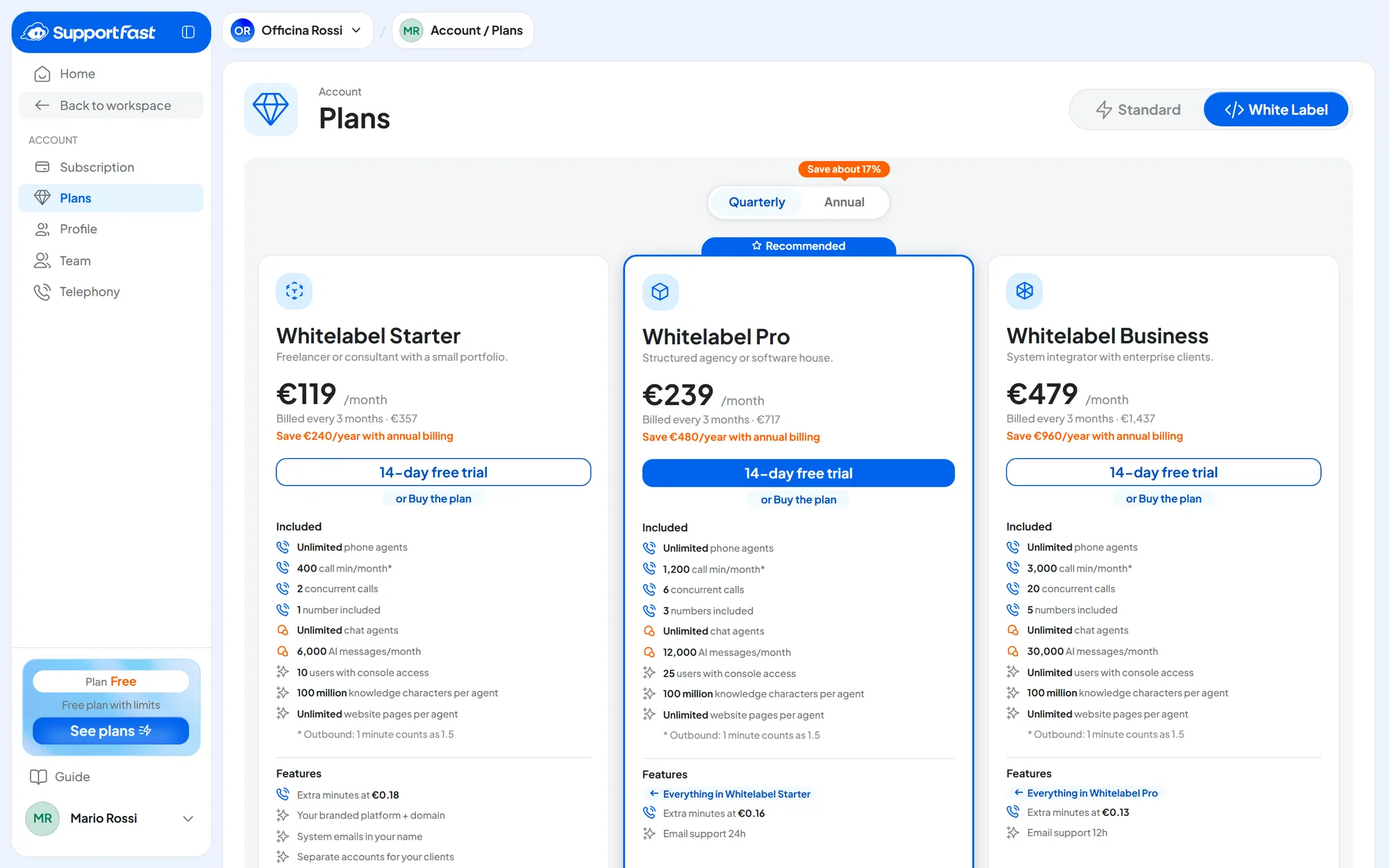
On the SupportFast console, in AccountPlans, choose White Label in the selector at the top right: three cards appear.
| Plan | Who it's for |
|---|---|
| Whitelabel Starter | “Freelancer or consultant with a small portfolio.” |
| Whitelabel Pro | “Structured agency or software house.” It has the Recommended ribbon. |
| Whitelabel Business | “System integrator with enterprise clients.” |
All three include the White Label features. As you move up a plan, these change:
- the monthly quotas: AI messages, call minutes, automation runs and campaign sends;
- users, included phone numbers and concurrent calls;
- how many automations and campaigns you can have;
- the price of an extra minute;
- the response time of email support.
Prices and quotas are on the cards. They change over time: you'll find them there, on the White Label page of our website and on the cards of the price list for your clients, with the date they apply from. Once the plan is active, your quotas and the month's usage are in AccountSubscription: see Plans, quotas and usage.
Quotas apply to the whole account. You share users, numbers, concurrent calls and monthly usage with your teammates and all your clients. Users include your own and test users. See Quotas add up on your plan.
#Billing periods
White Label plans are paid every three months or every year: above the cards, choose Quarterly or Annual.
The large price on the card is shown per month. Below it you see how much you pay at each renewal, for example “Billed every 3 months · …”. Prices exclude VAT.
You pay by credit or debit card, on the payment page. There you can enter your VAT number and a promo code, if you have one.
#The free trial
You can try a White Label plan free for 14 days, with all the features of the plan you choose. Meanwhile, you prepare your brand, domain, email and first clients.
Before you start
- A SupportFast account on the free plan. If you don't have one, sign up at app.supportfast.ai/register: a new account starts on the free plan. If you're on a paid plan, you move to White Label with an upgrade, without a trial.
- No previous trial. The trial is available once per account, even if you took it on another plan: in that case the card shows Start now and you pay right away.
- A credit or debit card: you pay nothing today.
-
Open the White Label plans
Go to AccountPlans, White Label family, and choose the billing period.
-
Start the trial
On the plan's card, press 14-day free trial. If you want to pay right away, without a trial, press the smaller button below it instead, or Buy the plan: that's exactly how the console writes it.
-
Check and confirm
The “Subscribe to SupportFast” page sums up the plan, the billing period, the date your payments will start and the line “No payment due today”. Press Start Free Trial.
-
Enter your card
Complete the payment page. At the end you return to the console.
Result
In AccountSubscription the plan shows “On trial”, with the line “The trial ends on …”.
From day one, emails are sent only from your address. With the White Label plan active, even on trial, automatic emails are sent only from the sender verified in Custom email. Until you verify it, no email is sent, not even to you: no password codes, no agent notifications, no emails from the Send Email action. Set up and verify the sender first.
#When the trial ends
On the date shown, the paid plan starts, with the billing period you chose, on the card you entered at the start.
If you don't want to continue, cancel before that date: in AccountSubscription press Manage Subscription, which opens the payment page. Canceling and reactivating work as for any plan: see Canceling the subscription. If you need help canceling, write to us at info@supportfast.ai before the trial ends.
Without a paid plan, the account goes back to the free plan. This happens when a cancellation takes effect, even if you canceled during the trial, and when an invoice for the plan remains unpaid. From that day:
- the portal closes with code 003: see The closed portal: codes 001–004;
- resources beyond the free plan's quotas go on forced pause, including your clients' users: you stay active;
- WhatsApp, Instagram, Messenger and calendars stop;
- on your clients' websites, the “Powered by SupportFast.ai” signature comes back at the bottom of the chat of the agents that are still active.
#If a payment fails
The portal closes immediately with code 004. Your clients' agents, however, keep replying on the website, on the channels and by phone. They stay active until the deactivation date written in the email SupportFast sends you about the failed payment. If the invoice isn't paid by that date, the account moves to the free plan, as above. How to pay it is in Subscription and payments.
#Changing plan
You can move up a plan from the console at any time: for example from Whitelabel Starter to Whitelabel Pro, or from quarterly to annual. You pay the difference for the remaining days right away or, if you change billing period, the whole new period minus the credit; the new quotas apply immediately. In the confirmation you can apply a promo code. The steps are in Upgrading.
If you move to White Label from a Standard plan, automatic emails are sent only from your verified sender from the moment of the upgrade: the notifications you used to receive stop until you verify the address in Custom email.
#Moving to a lower plan
A lower plan, or a shorter billing period, can't be chosen with an upgrade. On those cards you see “Not applicable with your current plan.” This also applies to Standard plans: you can't go back from White Label with an upgrade.
The change goes through a cancellation and a new purchase, as explained in Moving to a lower plan. The canceled plan stays active until it expires; you buy the new one afterwards, once the account is back on the free plan. During that switch, however short, everything described in When the trial ends happens. The portal closes with code 003, your clients' resources and users go on forced pause, and the channels stop.
With the new plan, resources on forced pause become active again on their own, oldest first, up to the new limits. The free trial doesn't become available again. If your clients already use the portal, write to us first at info@supportfast.ai: we'll help you choose the right moment.
#Frequently asked questions
Where do I find SupportFast invoices?
On the payment page, which you open with Manage Subscription. The details are in Subscription and payments.