

#What it's for
With the end-of-call webhook you can:
- save every call, with its outcome and summary, in your CRM or management software;
- open a case or a ticket with the data the agent collected;
- pass the call to Zapier or Make, and from there to hundreds of apps.
Before you start
- The “Post-call webhook” feature in your plan.
- An HTTPS address reachable from the Internet that accepts POST requests and responds within 10 seconds.
#Turning it on
-
Open the Post-call step
In the voice agent, go to Agent profileEdit ProfilePost-call: it's the fourth step of the setup. You can also get there from the Agent profile summary, with the button of the Post-call Actions area, which is called Edit, or Set up if the area isn't set up yet.
-
Turn on the webhook
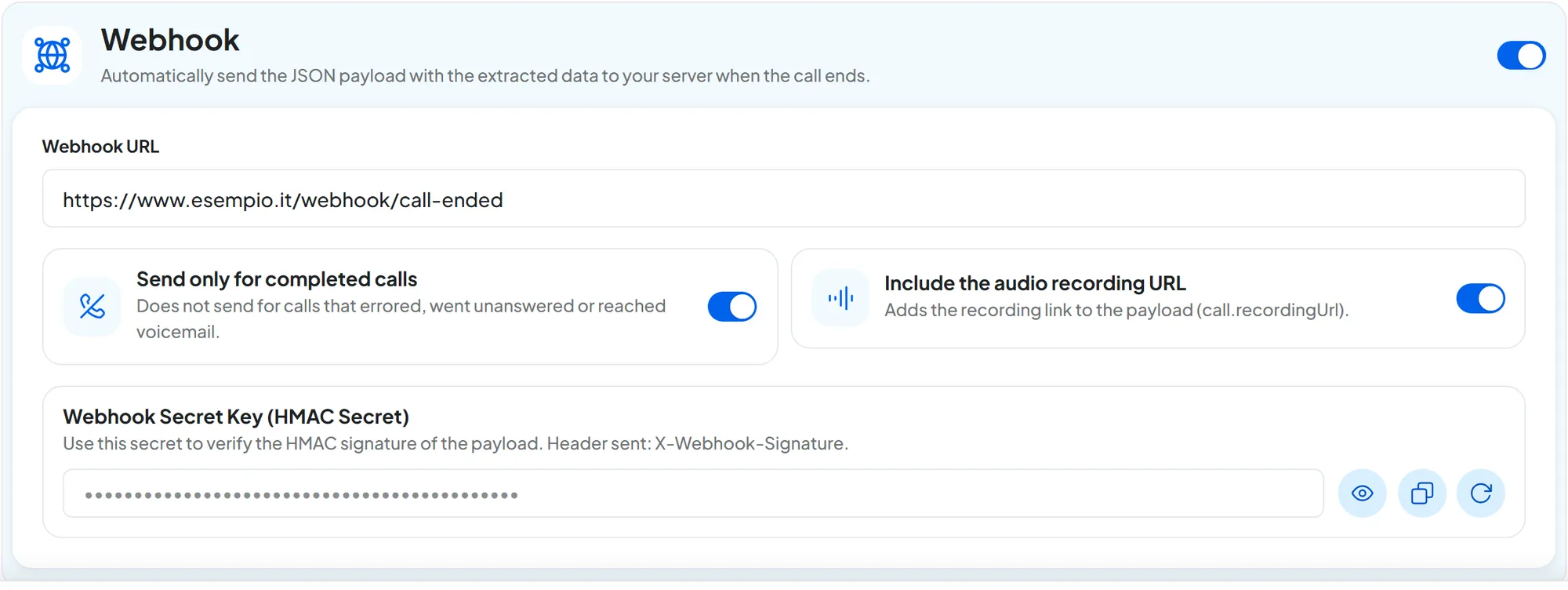
In the Webhook panel, switch on Turn on the webhook and type the Webhook URL, which must start with
https://. -
Choose the options
Send only for completed calls, on by default, sends the webhook only for successful calls, explained further down. Include the audio recording URL, on by default, adds the audio link. If recording is off in the General step, the link stays empty.
-
Save and copy the key
Press Save changes: the key is created at that moment. In the Webhook Secret Key (HMAC Secret) panel, press Show the key or Copy the key and put it in your server's configuration.
With Regenerate the key you create a new one. The confirmation warns that “Signatures made with the current key will no longer be valid: update the system that receives the webhook.”. Reading and regenerating the key take effect immediately, without saving.
#When it's sent
The webhook is sent after the end-of-call analysis: outcome, summary, sentiment and extracted variables are already in the JSON.
A call is successful when someone answered and said at least one word, or when it was transferred to a teammate. Voicemail, or an answer without words, doesn't count. It's the same definition as in Calls: list and details, and in the JSON it corresponds to call.reached equal to true.
- With Send only for completed calls on, the webhook is sent only for successful calls, transferred ones included: despite the name, the “Completed” status doesn't matter.
- With the option off, it's sent for every call that ended, even calls never answered or that went to voicemail. In those cases
call.reachedisfalseandcall.endReasonsays why the call ended.
#What your server receives
A POST request with a JSON body and these headers:
| Header | Value |
|---|---|
Content-Type | application/json |
X-Webhook-Signature | sha256= followed by the HMAC SHA-256 signature of the body, in hexadecimal. |
X-Webhook-Call-Id | The call's identifier, the same as call.id. |
JSON · example with test data
{
  "call": {
    "customerNumber": "+390212345678",
    "agentNumber": "+390612345678",
    "direction": "inbound",
    "startedAt": "19/10/2026 10:12",
    "endedAt": "19/10/2026 10:15",
    "duration": "3 min 5 s",
    "reached": true,
    "result": "appointment_booked",
    "resultText": "The customer booked a car service.",
    "sentiment": "positive",
    "summary": "Mario Rossi asks for a car service. The agent offers Thursday, October 22 at 9:30 and the customer accepts.",
    "transcript": "AI: Good morning, Officina Rossi, how can I help you?\n\nHUMAN: I'd like to book a car service.",
    "transferName": null,
    "recordingUrl": "https://www.esempio.it/registrazione-di-esempio.mp3",
    "appointment": {
      "startsAt": "22/10/2026 09:30",
      "calendarName": "Car service",
      "startsAtIso": "2026-10-22T07:30:00.000Z",
      "uid": "example-booking-123"
    },
    "variables": { "customer_name": "Mario Rossi", "license_plate": "AB123CD" },
    "id": "example-call-001",
    "conversationId": "example-conversation-001",
    "status": "ended",
    "endReason": "agent_endcall",
    "errorDetail": null,
    "durationSec": 185,
    "startedAtIso": "2026-10-19T08:12:04.000Z",
    "endedAtIso": "2026-10-19T08:15:09.000Z"
  },
  "messages": [
    { "role": "assistant", "content": "Good morning, Officina Rossi, how can I help you?" },
    { "role": "user", "content": "I'd like to book a car service." }
  ],
  "contact": {
    "fullName": "Mario Rossi",
    "email": "mario.rossi@esempio.it",
    "phone": "+390212345678"
  },
  "event": "telephone.ended",
  "variables": { "customer_name": "Mario Rossi", "license_plate": "AB123CD" }
}eventTextAlways
telephone.ended.callObjectThe call data, with the same names as the
{{call.*}}variables: what each field contains is in Call data. Readable fields are in the workspace time zone; those withIsoare dates in UTC. Coded fields have these values:direction:inboundoroutbound;reached:trueif the call was successful, as explained in When it's sent, otherwisefalse;result:resolved,unresolved,abandoned,appointment_booked,transferred,no_interaction,no_answer,voicemailorspam;sentiment:positive,neutralornegative;status:ended,failedortransferred;endReason, the reason the call ended:agent_endcall(ended by the agent),user_hangup(the customer hung up),timeout(maximum duration reached),silence_timeout(prolonged silence),transfer(transferred),voicemail(voicemail),no_answer(no answer),busy(busy),rejected(rejected),invalid_number(invalid number),blocked(blocked by the phone carrier),sip_error(line error) orerror(technical error).
Duration is counted from the answer, without the ringing: for a call never answered,
durationSecis 0 anddurationis empty.messagesListThe conversation, message by message:
roleisassistantfor the agent anduserfor the customer.contactObject or nullThe contact's full name, email and phone. It's
nullwhen no contact is linked to the call, for example if the caller's number is hidden.variablesObjectThe variables extracted from the call, with the names you chose in Data Extraction and Variables. Empty if extraction is off. The same object is also in
call.variables.
Missing data arrives as null or empty: for example the appointment, if none was booked, or the audio link, if nobody answered or the recording isn't ready yet.
#Verifying the signature
The signature tells you that the request really comes from SupportFast and hasn't been altered. Compute the HMAC SHA-256 of the body with the secret key, on the text exactly as you receive it and before parsing it into an object: even one different space changes the signature. Write it in hexadecimal with sha256= in front and compare it with the X-Webhook-Signature header.
Node.js with Express
const crypto = require("crypto");
const express = require("express");

const app = express();
const SEGRETO = process.env.SUPPORTFAST_WEBHOOK_SECRET;

app.post("/webhook/call-ended", express.raw({ type: "application/json" }), (req, res) => {
  const ricevuta = req.get("X-Webhook-Signature") || "";
  const attesa = "sha256=" + crypto.createHmac("sha256", SEGRETO).update(req.body).digest("hex");
  const valida = ricevuta.length === attesa.length &&
    crypto.timingSafeEqual(Buffer.from(ricevuta), Buffer.from(attesa));
  if (!valida) return res.sendStatus(401);

  res.sendStatus(200);
  const dati = JSON.parse(req.body.toString("utf8"));
  // save dati.call, dati.contact and dati.variables in your management software
});

app.listen(3000);
PHP
<?php
$segreto = getenv('SUPPORTFAST_WEBHOOK_SECRET');
$corpo = file_get_contents('php://input');
$ricevuta = $_SERVER['HTTP_X_WEBHOOK_SIGNATURE'] ?? '';
$attesa = 'sha256=' . hash_hmac('sha256', $corpo, $segreto);

if (!hash_equals($attesa, $ricevuta)) {
    http_response_code(401);
    exit;
}

http_response_code(200);
$dati = json_decode($corpo, true);
// save $dati['call'], $dati['contact'] and $dati['variables'] in your management software#If your server doesn't respond
- If the connection fails, if the 10 seconds pass or if you respond with a
5xxcode, it retries after 1, 3 and 10 seconds. At most four deliveries in all. - With a
4xxcode, it doesn't retry. - It doesn't follow redirects: a
3xxcode counts as an error and isn't retried. - It doesn't send to internal or private addresses, only to servers reachable from the Internet.
- After the last attempt, delivery stops. The call still stays on the agent's Calls page.
Respond right away, work afterwards. Respond 200 as soon as you've verified the signature and do the slow operations afterwards. To avoid saving the same call twice after a retry, check X-Webhook-Call-Id.
#How to test it
-
Prepare the receiver
Use your server or a test address that shows you incoming requests, such as those from Zapier or Make. Put it in Webhook URL and save.
-
Make a real call
Call the agent from your mobile phone, talk for a few seconds and hang up. With Send only for completed calls on, a call in which you say nothing doesn't trigger the webhook.
-
Check what arrived
The request arrives after the end-of-call analysis. Verify the signature and check the fields you need.
#With Zapier, Make or your management software
In Zapier, use the Catch Hook trigger of the Webhooks by Zapier app; in Make, the Custom webhook module. Copy the address they give you into Webhook URL: after the first call, the JSON fields are available in the following steps. These tools don't verify the signature on their own: keep the address private.
For your management software, ask the vendor whether it has a suitable address, or have a developer build one using the example above.
#Alternatively: an automation on telephony events
If you need only some of the data, or want to send it to several places, use an automation with an event from the Telephony category, such as Call ended. With the API node you call your server with the fields you choose; with the other nodes you send an email or a WhatsApp message.
| End-of-call webhook | Automation | |
|---|---|---|
| Where you set it up | In the voice agent's Post-call step, Webhook panel | In the workspace's automations |
| Data sent | Always all of it, in the same JSON | The data you choose |
| When it's sent | At the end of the call, transferred calls included | On the chosen event: Call ended doesn't fire for transferred calls |
| Security | HMAC signature with the key | The headers you set in the API node |
| Usage | No executions | Each run counts toward the month's executions |
| Plan | “Post-call webhook” | Automations and, for the API node, “API and webhooks” |
See Start events (triggers) and Calling an external API.
#Frequently asked questions
The signature never matches.
Check that you're using the current key and that the signature is in lowercase hexadecimal, with sha256= in front. The calculation is explained in Verifying the signature.
Can I send the data to more than one address?
The webhook has only one address per agent. For several destinations, go through Zapier or Make, or use an automation.