

It is the second step of the Agent profile: Agent profileEdit ProfilePrompt & Instructions.
Before you start
- Your business information: services, opening hours, prices, rules, and what the agent must do on the phone.
#Two ways to work
In “How do you want to create the prompt”, choose between two tabs. Switching from one to the other doesn't erase anything.
- Guided Generation (Recommended): answer a few questions about your business and the AI writes the prompt for you.
- Blank Sheet: you write or paste the prompt yourself.
When the agent already has a prompt, you see the “Current prompt” with its origin: “Generated with AI”, “Generated with AI and edited by hand” or “Written by hand”. Copy copies it to the clipboard, and Edit reopens the last mode you used. If the generator had doubts, you read them in “Generator notes”.
#Guided generation
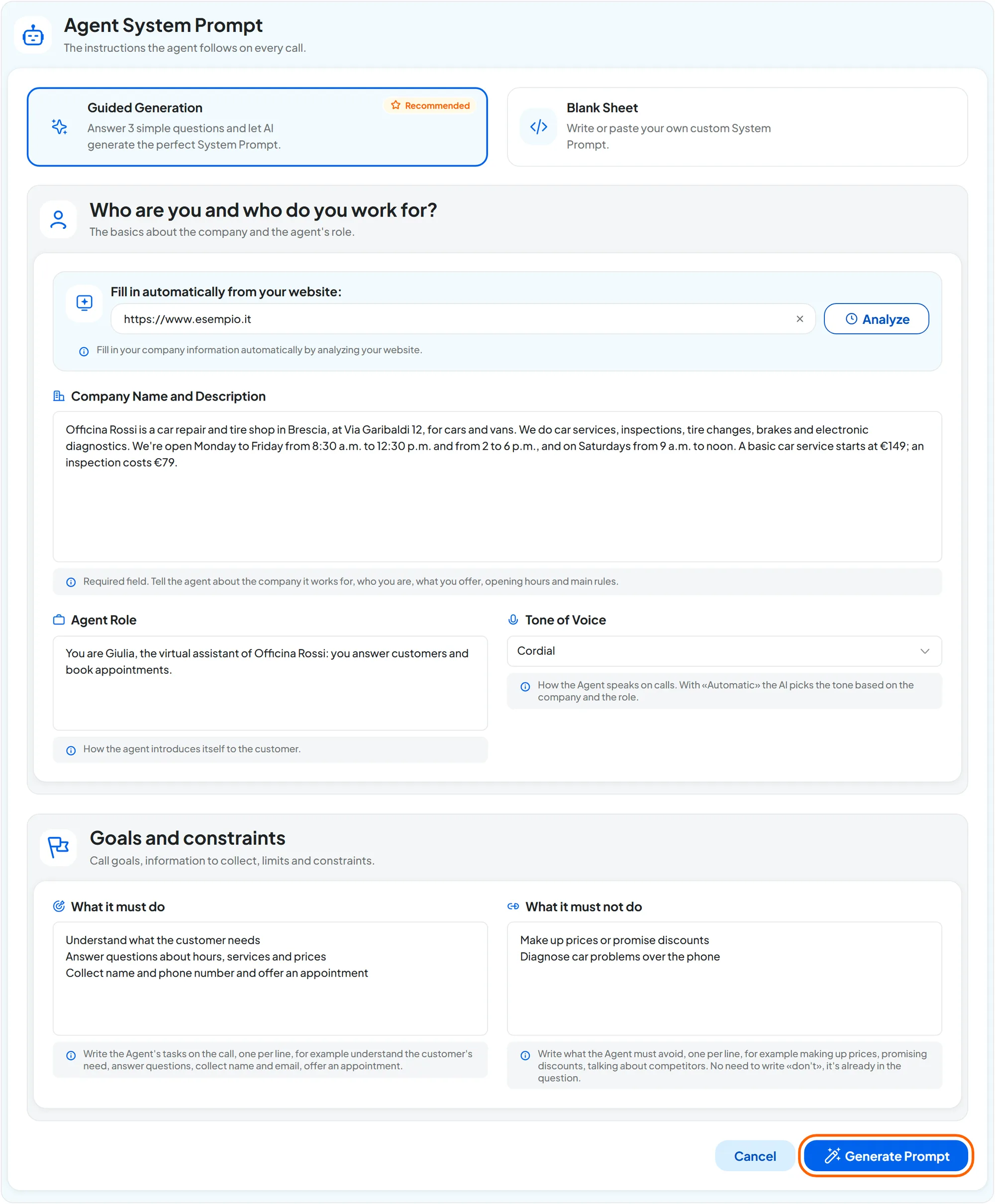
#Who are you and who do you work for?
- Fill in automatically from your website Address · max 500 characters
Type the website address, for example
https://www.esempio.it, and press Analyze. The analysis fills in only Company Name and Description and replaces the text that was there: “Company field filled in from the website” appears.The text it reads, however, isn't saved yet. Like the other guided generation fields, it is saved only when you press Generate Prompt and the generation finishes. If you leave the Agent profile or reload the page before that, you lose it.
- Company Name and Description Text · required · max 8,000 characters
“Tell the agent about the company it works for, who you are, what you offer, opening hours and main rules.” It is a single field, with the name and the description together, and it is the only required one. It is also the most important: the generator puts it into the prompt as it is.
- Agent Role Text · max 4,000 characters
“How the agent introduces itself to the customer.” For example: “You are Giulia, the virtual assistant of Officina Rossi: you answer customers and book appointments”.
- Tone of Voice Choice
Automatic, Professional, Cordial, Friendly, Empathetic or Direct. With Automatic, the AI picks the tone based on the company and the role.
#Goals and constraints
- What it must do Text · one item per line · max 4,000 characters
The agent's tasks on the call, one per line: understand what the customer needs, answer questions, collect name and email before booking an appointment.
- What it must not do Text · one item per line · max 4,000 characters
What the agent must avoid, one per line: making up prices, promising discounts, talking about competitors.
- Fill in the fields
At least the Company Name and Description field: if it is empty, the console flags it with “Required to generate the prompt.” The more precise you are, the better the result.
- Generate
Press Generate Prompt.
- Reread
At the end, “Prompt generated and saved” appears and you see the prompt in use. It is saved automatically.
Result
The “Prompt & Instructions” area of the summary becomes “Configured”.
Generating again replaces the prompt in use immediately. There is no confirmation: when the generation finishes, the new prompt is already saved and the agent uses it from the next call. The console only warns you if the current prompt was written or edited by hand. Before regenerating, copy the current prompt with Copy, or try the new prompt on a copy of the agent: see Duplicating and moving.
Cancel returns to the saved prompt without generating.
Small changes from the blank sheet. To change a detail of the generated prompt, such as an opening time, correct it from the blank sheet: the origin becomes “Generated with AI and edited by hand”.
#The blank sheet
“Write or paste the prompt the agent will use on calls.” The Enter the Prompt field accepts up to 30,000 characters and has a counter. The blank sheet is saved with Save changes, like the other fields.
#How to write a prompt for voice
On the phone, the customer can't reread anything. Every sentence the agent says must be easy to hear and to understand the first time.
- Short sentences. Ask the agent for answers of one or two sentences.
- One question at a time. A listener remembers one question, not three.
- No lists, symbols or links in what it says. If the agent has to tell the customer a bulleted list or a web address, it may read it out with the symbols or skip it. The headings between
##in the example below are a different matter. They only divide the prompt into parts, as guided generation also does: they aren't sentences to say to the customer. - Numbers, times and prices the way people say them. “from nine a.m. to one p.m.”, “one hundred twenty euros”.
- Confirming details. Name, phone, email and dates must be repeated back and confirmed.
- What to do when it doesn't know. Write that it should say “I don't have that information, I'll have someone call you back”. If calls show that a piece of information is missing, add it to the prompt.
- How to close. Summary, goodbye, end of call.
Ask for first name, last name, phone, email, license plate and car model.
Ask for one detail at a time: first the name, then the phone number, then the license plate. After each answer, repeat the detail and ask for confirmation.
For email addresses, license plates and codes, the Precise Information Handling panel also helps.
#What goes in the prompt and what doesn't
- When to transfer the call and which appointment to offer don't go in the prompt. You write them in the “Activation Condition” of each destination and each event. In the prompt, instead, write which details to ask for before booking and what to do if the transfer fails or isn't possible, as in the example below.
- When to say goodbye and end the call goes in the prompt, as in the example below. The agent ends the call on its own if Automatic call closing is on in the General step.
- The prompt also holds the other behavior instructions: which key to press in an automated menu, how to repeat an email address, what to do if the person doesn't want to be called.
#A complete example
You can paste it into the blank sheet and adapt it to your business.
#Car repair shop
Prompt · Officina Rossi
## Identity ##
You are Giulia, the virtual assistant of Officina Rossi, a car repair shop in Bergamo.
You answer the phone for our customers. Speak formally, in a warm, practical tone.

## What you know ##
We are open Monday to Friday, from eight in the morning to noon and from two to six in the afternoon.
We are closed on Saturdays and Sundays.
We do scheduled servicing, vehicle inspections, tire changes, brakes and electronic diagnostics.
A vehicle inspection costs seventy-nine euros. Servicing starts at one hundred twenty euros:
the exact price depends on the model.
We don't do bodywork and we don't sell cars.

## What you must do ##
Find out what the customer needs.
If they want an appointment, before booking, ask for one detail at a time:
first and last name, car model, license plate, and the problem in a few words.
After each detail, repeat it back and ask for confirmation. Repeat the license plate letter by letter.
If your colleague doesn't answer, apologize, take the customer's name and number,
and tell them someone will call them back.

## How you speak ##
Short sentences, one question at a time.
Say numbers, times and prices in full, the way you would say them out loud.
If you don't know something, say so and offer to have a mechanic call the customer back.

## What you must not do ##
Don't diagnose problems over the phone and don't promise when the car will be ready.
Don't give any prices other than the ones written here.

## Closing ##
Before saying goodbye, sum up what you agreed. Then say goodbye and end the call.
Do you prefer guided generation? Use the example as an outline. The “What you know” part goes in Company Name and Description and “Identity” in Agent Role. The other lines go in What it must do and What it must not do.
#How to check
After each change, make a test Web Call with your customers' real questions. Then read the transcript in Calls: if the agent gets something wrong, correct the prompt and try again.
#Frequently asked questions
How long should the prompt be?
A clear prompt of one or two pages works better than a very long one. Include the information that is really needed on the phone.