

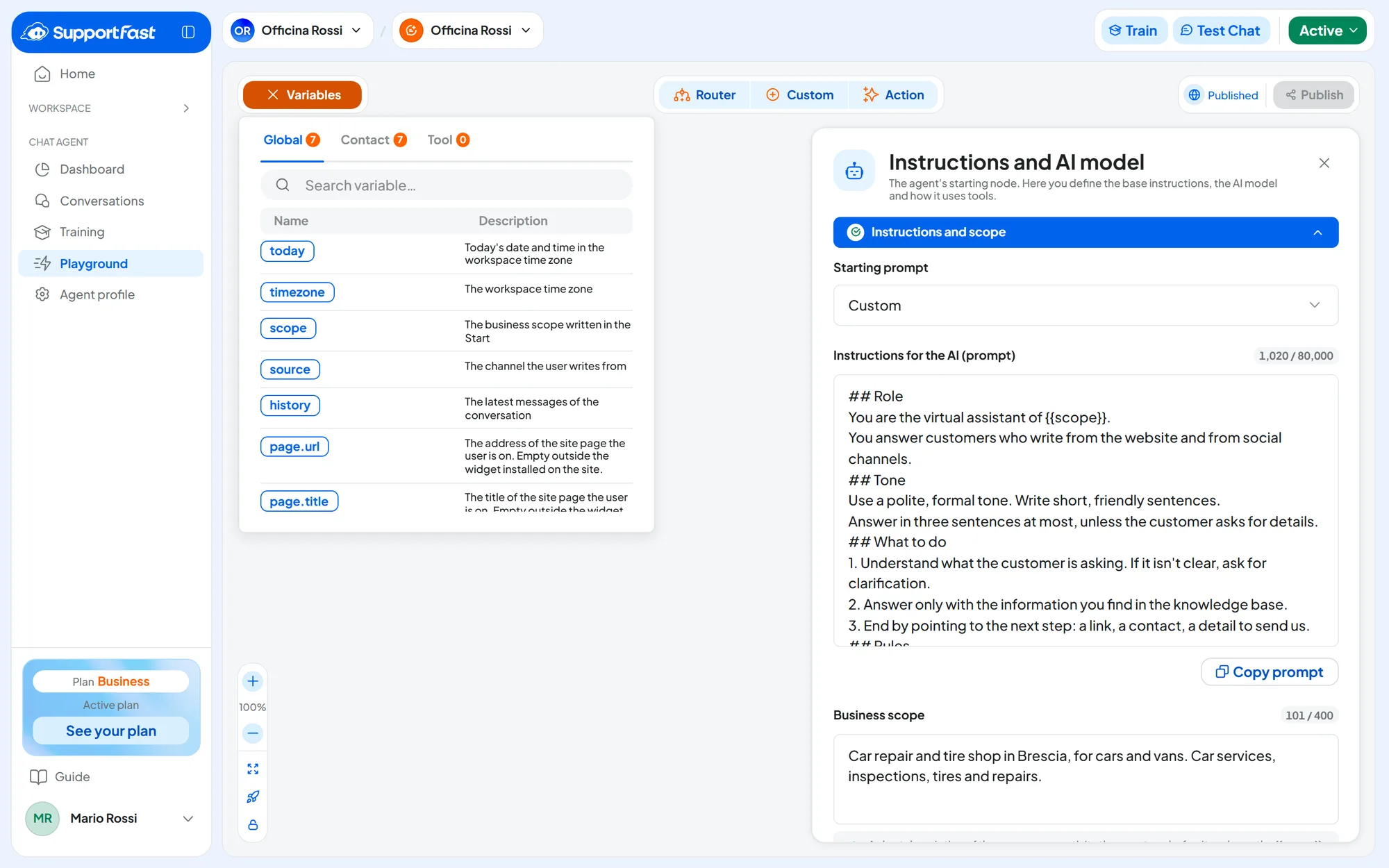
You write the instructions in the Playground, in the Instructions for the AI (prompt) field of the AGENT node: see Playground: instructions and flows. “Prompt” is the technical name for this text, which the AI reads before every reply. You can write them in your own language even if customers write in other languages: see Supported languages. The clearer and tidier they are, the better the agent follows them.
#Instructions or knowledge: what goes where
| In the instructions (Playground) | In the knowledge base (Training) |
|---|---|
| Who the agent is and who it works for | Services, products and prices |
| The tone: formal or informal, how long the answers are | Hours, addresses and contacts |
| What to do, in what order | Procedures, terms, return policies |
| What not to do | Frequently asked questions with their answers |
| When to hand over to a person | Manuals, catalogs, price lists |
A price written in the instructions has to be updated by hand and ends up contradicting the website: write instead “For prices and hours, use only the information in the knowledge base; if a price isn't there, say that a quote is needed”. The exception is a few details that must always be there, such as the number for emergencies: keep them in one place only. Where to correct a wrong answer is explained in Why the agent answered that way.
#The starting prompts
In the Playground, Starting prompt offers five ready-made sets of instructions.
| Prompt | What it's for |
|---|---|
| AI Chatbot | A general-purpose assistant. It is the one new agents use. |
| Customer support | Customer care, with a patient and empathetic tone. |
| Sales agent | Presents products and services and highlights their benefits. |
| Technical support | Guides the customer step by step and asks for confirmation after each step. |
| E-commerce support | Products, orders, shipping, payments and returns. For each product it gives the name, link and price. |
As soon as you edit the text, or if you write your own instructions, the Starting prompt list shows Custom: it means the text no longer matches one of the five.
You can use them in three ways:
- keep the text as it is and write the scope carefully;
- add your own rules at the end;
- write the instructions from scratch, with the structure below.
If you rewrite everything, keep the rules about knowledge. The starting prompts tell the agent to use only the information it finds and to admit when it doesn't have it. If you replace them, write these rules yourself too: otherwise the agent may make things up.
#The recommended structure
Split the instructions into six blocks, each with a heading, as in the template below. The headings help you find the rules again and help the agent follow them. In the Rules block, write decisions as “If… then…”.
Template · copy and complete
## Role
You are the virtual assistant of {{scope}}.
You answer customers who write from the website and from social channels.

## Tone
Use a polite, formal tone. Write short, friendly sentences.
Answer in three sentences at most, unless the customer asks for details.

## What to do
1. Understand what the customer is asking. If it isn't clear, ask for clarification.
2. Answer only with the information you find in the knowledge base.
3. End by pointing to the next step: a link, a contact, a detail to send us.

## Rules
- If the customer asks for a quote, ask for their name, phone number and a short description.
- If you can't find the information, say so and offer our contact details.

## What not to do
- Don't make up prices, dates or availability.
- Don't discuss topics unrelated to our business: bring the conversation back to our services.

## When to hand over to a person
- If the customer is unhappy or asks to speak to someone, apologize and give the number +39 02 1234 5678 (Monday to Friday, 9 am to 6 pm).
For the last block, you decide what to offer: a phone number, an email or, if you have turned on live chat (the Operator Chat tab), the Request an operator command in the chat menu.
In the role sentence, use {{scope}}, as in the template: if the business description changes, you change it in one place only, the scope. In place of {{scope}}, the agent reads the text of the scope. For example, with the scope “Officina Rossi, a car repair and tire shop in Brescia, for cars and vans”, the role sentence becomes:
You are the virtual assistant of Officina Rossi, a car repair and tire shop in Brescia, for cars and vans.So write the scope as what follows “of…”: the business name, what it does, for whom and where, without “We are” or “We”. See How to write the scope. The other variables, such as today's date or the customer's name, are in Variables.
#Writing rules
- Be specific. “Three sentences at most” works better than “be concise”.
- Say what to do, not only what to avoid. Every ban comes with its alternative.
- One rule, one place. Two rules that contradict each other confuse the agent.
- Keep it short. A few hundred words are usually enough.
- Use examples with care. The agent may repeat example sentences word for word, with the data they contain. Use short examples with generic data.
- Promise only what really happens. If the agent isn't connected to your calendar, don't ask it to confirm appointments.
- In sensitive fields, set boundaries. For a medical practice or a law firm, write that the agent gives no diagnoses or legal advice, and who to call in an emergency.
- Change one thing at a time. After each change, ask the same questions again in the Test Chat: see Testing and publishing.
#An example: online store
For a different business, it is mostly the role, tone and rules that change. Here are those blocks for an online store with a casual tone, with the scope “Bottega Verdi, an online store of handmade ceramics shipping throughout Italy”. Names and addresses are made up.
## Role
You are the assistant of {{scope}}. You help customers choose products
and answer questions about shipping, payments and returns.

## Tone
Use a warm, casual tone and talk to customers as you would to a friend. Keep answers short.

## Rules
- When you recommend a product, give its name, price and link,
  exactly as they are in the knowledge base.
- If the customer asks where their order is, ask them to write
  to ordini@esempio.it with their order number: you can't see orders from here.
- Don't make up discounts or promo codes.#Frequently asked questions
Can I give the agent a name, for example “Giulia”?
Yes. Write “Your name is Giulia” in the Role block and put the same name in Agent profileInterface, in the Chat name field. We still recommend having the agent say that it is a virtual assistant.